Using AI with GitCMS
How GitCMS connects ChatGPT and Claude to a task-first editorial workflow through MCP.
GitCMS connects AI assistants to your content workflow through the Model Context Protocol (MCP).
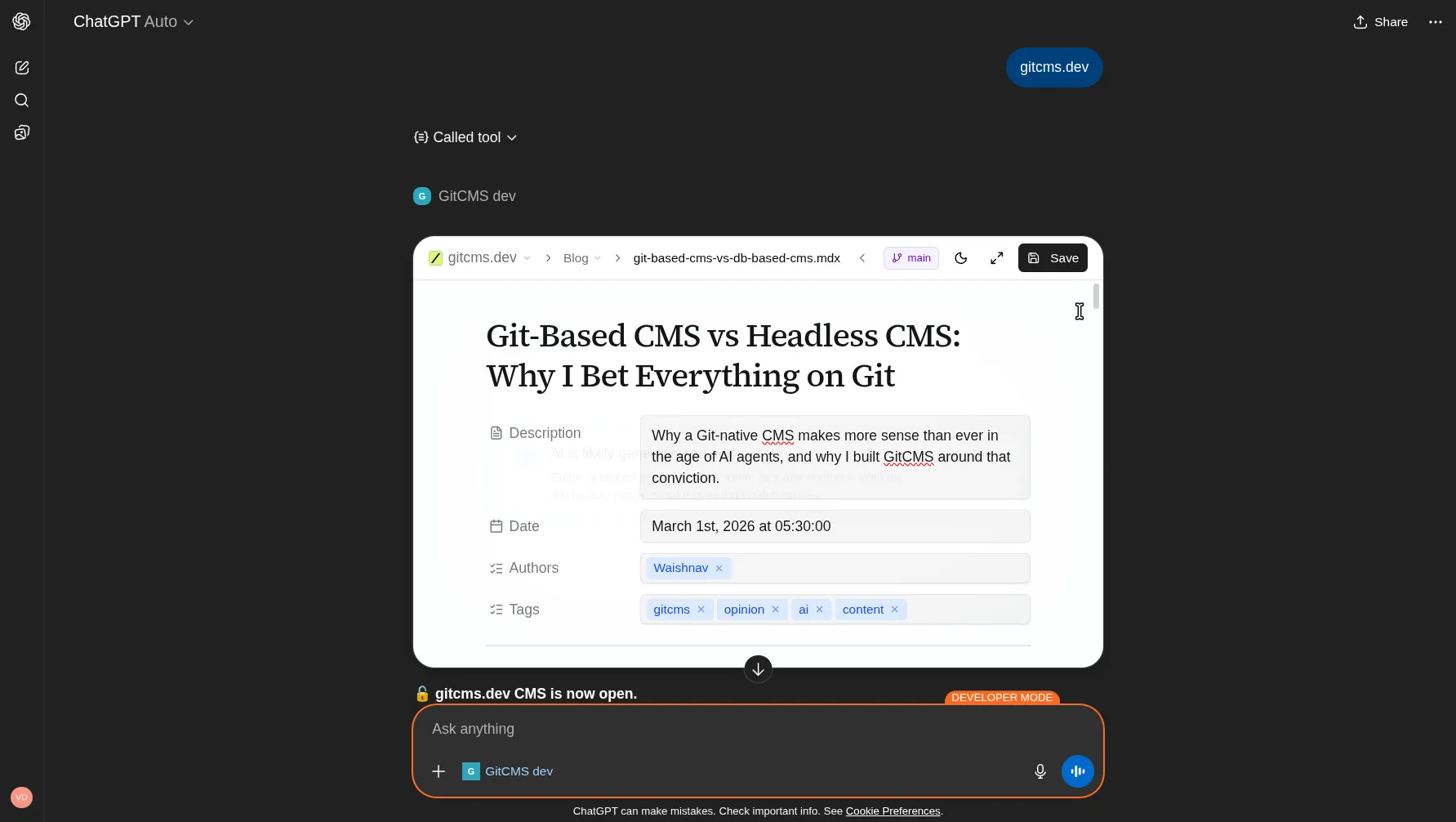
Today, the documented GitCMS MCP experience is for ChatGPT and Claude. When connected, GitCMS can open the editor inside the chat, work with your site configuration, and help move content through a task-first editorial flow.
You do not need to speak in Git or CMS implementation terms to use it well. Prompts like "edit this blog post", "tighten this page", or "rewrite this live URL" are valid starting points.
The useful part is not just “AI writes content.” GitCMS gives the model:
- your site scope
- your collections and frontmatter schema
- your editorial workflow
- your
CONTENT.mdwriting instructions - a visual editor and review path instead of copy-paste busywork
Before you start
Before using GitCMS with AI, make sure:
- your repository is connected in GitCMS
.gitcmshas been initialized- the site is licensed because MCP is not available in preview mode
- your
CONTENT.mdfile is in reasonable shape if you want stronger brand-voice guidance
Useful links:
- CLI Onboarding if
.gitcmsis not set up yet - Licensing & Preview for MCP access rules
- CONTENT.md for site-wide writing instructions
Supported clients
GitCMS documents these clients today:
- ChatGPT — See the ChatGPT setup guide
- Claude — See the Claude setup guide
- Static-token clients — See MCP Personal Access Tokens for OpenClaw, Hermes, Manus, OpenHarness, Harness, and custom MCP clients.
Other MCP-compatible clients may work, but setup and behavior can vary. If a client supports OAuth, use the ChatGPT or Claude setup pattern. If it asks for a static token, use a personal access token.
How GitCMS MCP works today
The current GitCMS writing flow is task-first.
In practice, that means:
- Brainstorm in chat first.
- Once the angle is clear, create a content task.
- Ask the model to draft against that task.
- Refine in conversation or in the editor.
- Submit the task for review.
This matches the underlying MCP tool surface and the editorial workflow in GitCMS.
If your site uses Review before publish, this is the recommended path. It keeps drafts scoped to a task and makes review much easier for the team.
Core MCP workflow tools
You do not need to call tools manually, but it helps to understand the flow the model is working through:
list_sites— find the GitCMS sites you can work withget_site_config— load site structure, collections, and CONTENT.md writing instructionscreate_content_task— create a new editorial task once the idea is approvedlist_content_tasks/get_content_task— find or reload an existing taskwrite_content— save draft content into that tasklist_content_entries/read_content_entry— inspect existing content and repo contentsubmit_content_for_review— move the task into reviewsuggest_content_edit— queue reviewable edit suggestions in the fullscreen editor
Because of that tool surface, prompts that say “brainstorm first, then create a content task, then draft” work better than prompts that jump straight to writing without task context.
You still do not need to name tools directly. The better pattern is to express intent in plain language and let GitCMS load the right context.
Recommended workflow
Here is the workflow we recommend in docs and examples:
- Brainstorm Ask the model to help with topic angles, outlines, and audience fit before it creates anything.
- Create a content task Turn the chosen idea into a task with notes, references, and desired outcome.
- Draft the first version Be explicit about collection, entry path, locale, and frontmatter values you care about.
- Revise Ask for structural rewrites, tighter intros, stronger CTAs, or better examples.
- Submit for review Use the same review path as the rest of your team.
For example:
Help me brainstorm three post ideas for our developer docs audience.
Do not create content yet.
Create a content task for the strongest idea.
Title it "Migrating from WordPress to a markdown-based docs workflow"
and include notes about target audience, angle, and CTA.Now draft the first version for that content task in the posts collection.
Keep the tone practical and leave it ready for review.I want to edit this blog post:
https://gitcms.dev/blog/content-is-just-code
Please read it first, then rewrite the introduction to be sharper and less repetitive.See Task-First AI Workflows for more complete prompt patterns.
What AI is good at in GitCMS
GitCMS MCP is particularly useful for:
- turning brainstormed ideas into first drafts
- revising existing docs, blog posts, and changelogs
- adding or updating frontmatter with valid field values
- repetitive editorial tasks across many entries
- locale-aware content work when you specify the target locale
- reviewable fullscreen edit suggestions during rewrite sessions
CONTENT.md matters
If you want better output, keep CONTENT.md current.
That file gives the model reusable guidance like:
- who you write for
- your brand voice
- what to avoid
- preferred structure
- terminology to keep consistent
Think of CONTENT.md as the persistent editorial brief the model can reuse across many content tasks.
You do not need to tell ChatGPT or Claude to "use CONTENT.md". GitCMS loads those instructions as part of site context during writing flows.
Safety and limits
GitCMS MCP does not mean autonomous publishing.
- AI still works inside your GitCMS workflow
- schema validation still applies
- your repository remains the source of truth
- review rules still govern what ships
- the model should create or work from a content task, not bypass it
That is the point: faster drafting, better structure, and less manual busywork without losing editorial control.
Next steps
- Connect your client: ChatGPT setup or Claude setup
- Read Task-First AI Workflows
- Tighten your
CONTENT.md - Use the CLI onboarding prompt if your repo is not initialized yet