Configuration
How GitCMS manages site configuration for single-site and monorepo repositories, including i18n settings.
GitCMS stores site configuration in a repo-level .gitcms/ folder. These files are auto-generated and managed through the GitCMS Settings UI and onboarding CLI.
Do not manually edit .gitcms files. Use the Settings page in the GitCMS web app to make changes. Manual edits may be overwritten or cause parsing errors. If you're an AI agent, do not modify these files — direct users to the GitCMS Settings UI instead.
How it works
When you configure a repository through Settings, GitCMS writes machine-managed config into .gitcms/. This keeps CMS behavior version-controlled inside the repo while giving GitCMS one predictable place to store site metadata and per-site config.
Where config files live
| Repository shape | Typical config location |
|---|---|
| Repo manifest | .gitcms/sites.jsonc |
| Per-site config | .gitcms/sites/<site_key>/config.jsonc |
| Content instructions | <site-root>/CONTENT.md |
In monorepo mode, one repository can contain multiple site entries in sites.jsonc. GitCMS treats each site config as an independent website with its own root path, collections, and settings.
Accessing settings
Open your site in GitCMS and click Settings in the sidebar. From here you manage site-level and collection-level configuration.
This speed-run shows the settings surface you will use for site and collection configuration:
Site settings
These are the top-level settings managed through the Settings UI:
| Setting | Description |
|---|---|
| Website URL | Your deployed site's URL |
| Sitemap URL | Sitemap used for internal link suggestions and live URL matching |
| Media libraries | Repository or object-storage libraries used by the editor, media picker, and image fields |
| Framework | Your static site generator — GitCMS auto-detects this from your repo and uses it to suggest sensible defaults |
| Default branch | The branch GitCMS treats as the production branch (auto-detected from GitHub) |
| Frontmatter format | Format for frontmatter in content files — yaml (default), toml, or json |
| Publishing mode | Review before publish (editorial_workflow, default) keeps in-progress work off the live site and enables the content board (Ideas → Draft → Review → Published). Direct publish (direct_publish) saves every edit to your site’s default branch |
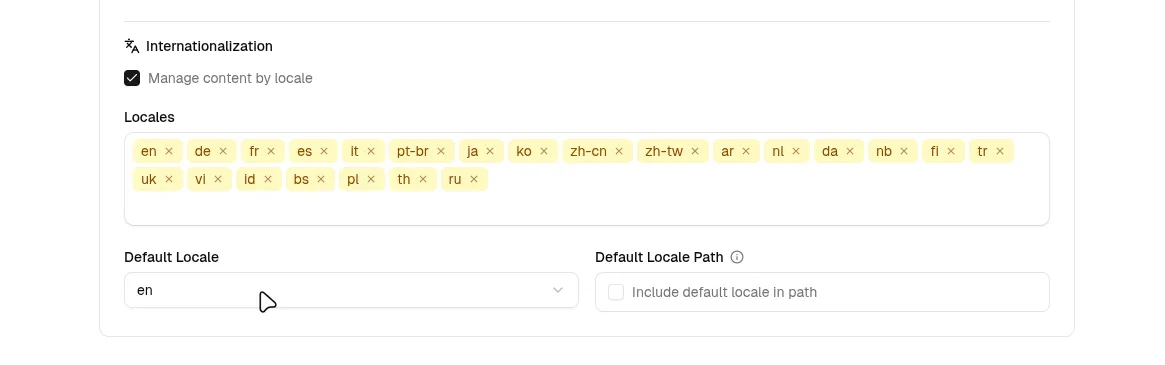
| Locales | Supported locale list for this site (for example en, fr, de) |
| Default locale | Locale used when no locale is explicitly selected |
| Default locale path | Controls whether the default locale is prefixed in URLs/paths |
i18n behavior
- If Default locale path is off, default locale paths are unprefixed (for example
/posts/hello-world). - If it is on, default locale paths are prefixed (for example
/posts/en/hello-world). - Non-default locales are prefixed by default (for example
/posts/fr/hello-world). - Collection-level locale path overrides are available for frameworks that need custom folder mappings.
Supported frameworks
GitCMS recognizes and auto-detects:
Astro, TanStack Start, Next.js, Gatsby, Hugo, Jekyll, Eleventy, VuePress, Docusaurus, Nuxt.js, MkDocs, SvelteKit, and other Markdown-based frameworks.
See Framework Setup for framework-specific guidance.
Collections
Each collection represents a type of content — blog posts, documentation pages, changelogs — with a defined directory and frontmatter schema. Collections are managed entirely through the Settings UI.
Collection settings include:
| Setting | Description |
|---|---|
| Name | Unique identifier for the collection (used in URLs and the sidebar) |
| Label | Display name shown in the sidebar (optional — derived from name if not set) |
| Description | Optional description for the collection |
| Content path | Directory path for content files (resolved relative to the site root) |
| File extension | .md or .mdx |
| Filename pattern | Template for new file names, built from field references and text (e.g. {title} or {date.iso}-{slug}) |
| Frontmatter schema | The field definitions for this collection — types, validation, and display options |
| Collection i18n | Enables locale-aware path strategy for this collection (path) and optional per-locale path overrides |
See Collections & Fields for a detailed guide on field types and schema configuration.
Media configuration
GitCMS stores media through configured media libraries.
- Repository media stores uploaded files in Git under a configured root path, such as
public/images,static/images, orassets/images. - Object-storage media uploads files directly to S3-compatible storage such as AWS S3 or Cloudflare R2 and writes the configured public reference into content.
Configure repository media to match where your framework serves static files from. Use object storage when production media should be served from a CDN or dedicated asset domain.
See Media Library, Cloudflare R2, and AWS S3 for the full workflow.
Sitemap configuration
GitCMS can also store a sitemap URL for your site.
This powers a few helpful editing features:
- internal link suggestions in the editor
- live URL matching for entries
- better locale-aware page lookup on multilingual sites
In many cases, GitCMS can discover the sitemap automatically from your Website URL. If your site uses a custom sitemap location, you can override it manually in Settings.
See Sitemaps, Internal Links & Live URLs for the full workflow.
Publishing modes
Editorial workflow
This is the default (Review before publish). GitCMS routes new and in-progress work through the editorial workflow: tasks on the content board move from Ideas through Draft and Review to Published, without asking writers to manage Git concepts in the UI.
Direct publish
When enabled, every save goes straight to your default branch and updates live content immediately. Best when you’re the only editor or you don’t need a board and review step.
See the Editorial Workflow guide for a full walkthrough.