
Choosing between a git-based CMS and an API-based headless CMS is less about ideology and more about workflow: where content lives, how people edit it, and how changes reach production.
A quick naming note: “headless CMS” technically means the CMS does not own the frontend. In that broad sense, a git-based CMS can also be headless. In this guide, I’m using “headless CMS” the way the market usually uses it: an API-first, usually database-backed CMS where your frontend fetches content through REST or GraphQL.
If you want the short answer:
- choose an API-based headless CMS when you need a dashboard-first editor, real-time collaboration, deeply relational content, or multi-channel delivery
- choose a git-based CMS when your team already works in Git, your content is mostly pages and posts, and you want content and code to ship together and let AI manage your content
This guide explains the tradeoffs.
What Is a Headless CMS?
A headless CMS stores content in a centralized database and exposes it through APIs, typically REST or GraphQL. "Headless" means the CMS has no built-in frontend. You fetch content at build time or runtime and render it however you want.
Examples: Contentful, Sanity, Strapi, Payload, Hygraph, Storyblok, DatoCMS, WordPress (headless mode).
How it works:
- Editors create and manage content through a hosted dashboard
- Content is stored in a managed database, or a self-hosted database for tools like Strapi and Payload
- Your frontend fetches content via API calls
- Changes go live when the API response updates, or after a rebuild trigger
The CMS vendor manages the database, editor UI, access control, and content delivery. Your codebase consumes the content as data from an external service.
What Is a Git-Based CMS?
A git-based CMS stores content as files — Markdown, MDX, YAML, JSON — directly inside your Git repository. The repo is the single source of truth. Every edit produces a real Git commit, and content ships to production through the same deploy pipeline as your code.
Examples: GitCMS, Tina, Decap CMS (formerly Netlify CMS), Cloudcannon, Prose.
How it works:
- Editors write in a visual editor, or directly in Markdown
- Every save creates a Git commit in your repository
- Content files live alongside your code in the same repo
- Deploys happen through your existing CI/CD pipeline, usually push to main and site rebuilds
There is no external database. Your Git history is your version control, audit log, and backup.
Architecture Comparison
At the infrastructure level, the difference is straightforward:
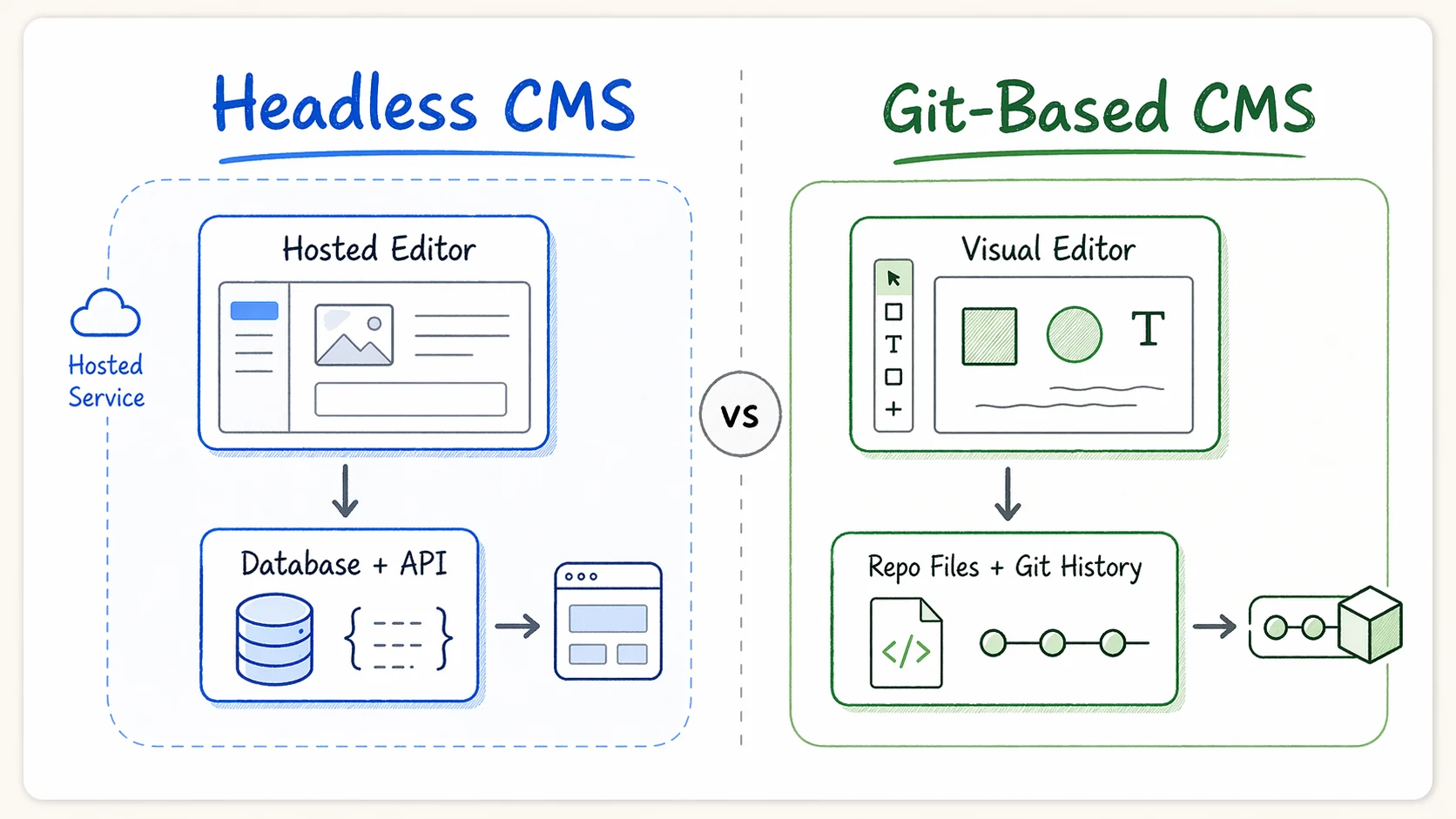
| | Headless CMS | Git-Based CMS |
|---|---|---|
| Content storage | Managed database, vendor-hosted or self-hosted | Files in your Git repository |
| Content format | Structured JSON via proprietary schema | Markdown, MDX, YAML, JSON, open formats |
| API layer | REST or GraphQL APIs queried at build or runtime | No API, content is read directly from the filesystem |
| Version control | Proprietary revision history inside the CMS | Native Git history (git log, git diff, git blame) |
| Deploy pipeline | Webhooks or runtime API calls | Standard Git push, CI/CD, deploy |
| Editor experience | Hosted dashboard with rich UI | Visual editor that commits to your repo |
| Vendor dependency | Content is locked in the vendor's database format | Content is portable Markdown/MDX files |
Content Workflow
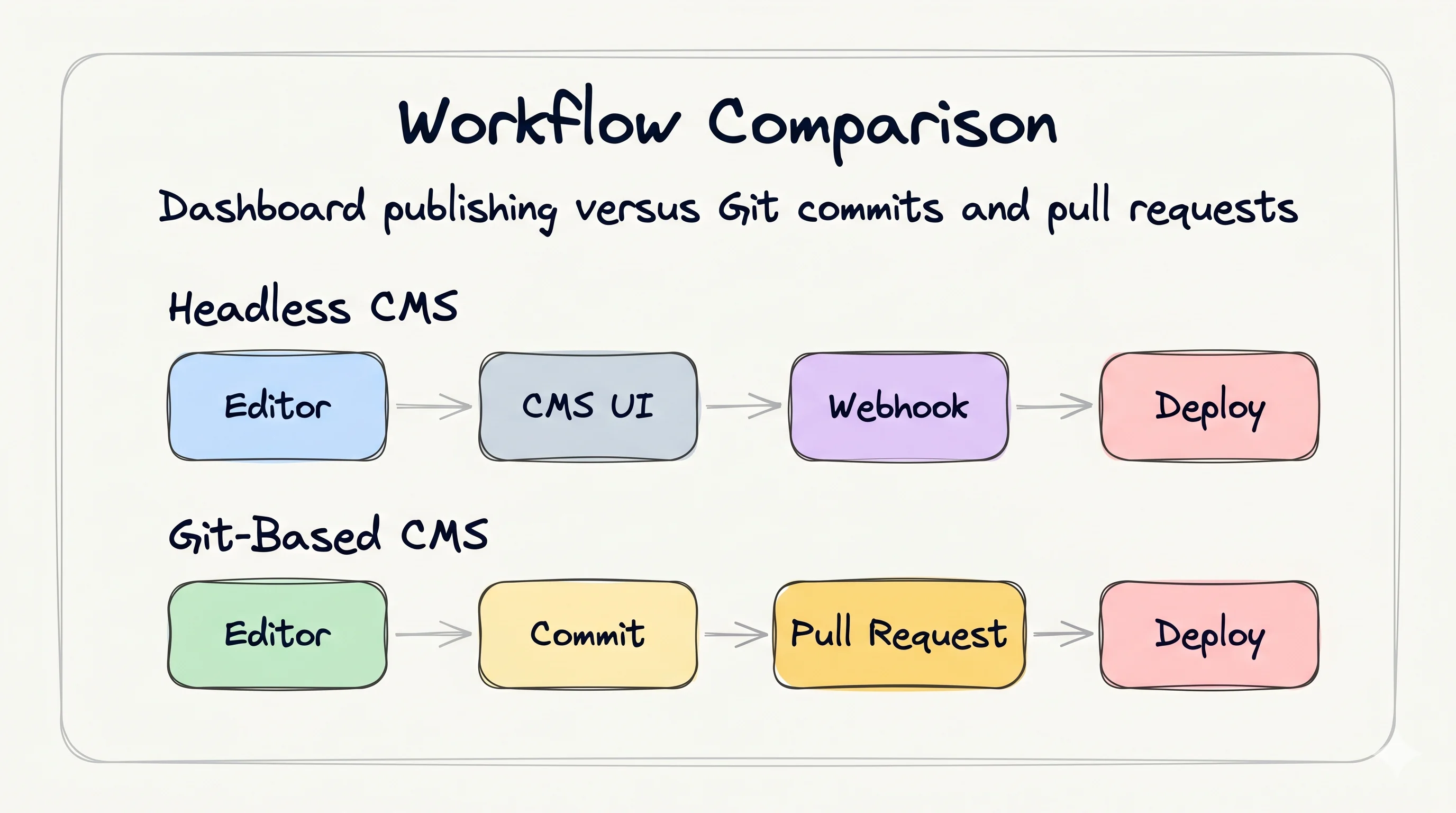
Headless CMS workflow
Content and code live in separate systems. Editors work in the CMS dashboard. Developers work in the codebase. The two are connected by API calls and webhook triggers.
Creating a blog post:
- Editor opens the CMS dashboard and creates a new entry
- Fills in structured fields like title, body, and metadata
- Hits "Publish" and the content is saved to the database
- A webhook fires and triggers a site rebuild, or content is fetched at runtime
Reviewing changes: Reviews happen inside the CMS. Some tools offer draft and preview modes, but code changes and content changes are still usually reviewed in separate systems.
Git-based CMS workflow
Content and code live in the same repository. Editors can use a visual editor or write Markdown directly. Every change flows through Git.
Creating a blog post:
- Editor opens the visual editor, or creates a
.mdxfile - Writes the post with a Notion-like editing experience
- Saves and a Git commit is created automatically
- The commit is pushed and standard CI/CD deploys the site
Reviewing changes: Content changes show up as pull requests. Code reviews and content reviews happen in the same place, which makes it easier to ship a feature and its documentation together.
The key difference
With a headless CMS, content and code have separate lifecycles. With a git-based CMS, content and code share the same lifecycle: same repository, same branches, same PRs, same deploy.
Developer Experience
Setup and integration
Headless CMS: Requires creating an account, defining a content schema in the CMS dashboard, generating API keys, installing an SDK or writing API queries, and handling authentication. Your build process gains a network dependency.
Git-based CMS: Content files are already in your repo. Configuration defines which folders contain which content types. No API keys, no SDK, no network dependency during builds. If you use a static site generator like Astro, Next.js, or Hugo, you likely already have Markdown content support built in.
Local development
Headless CMS: Local dev either hits the live API, which needs network, or requires mocked API responses. Some tools offer a local emulator, but that is still an extra setup step.
Git-based CMS: Content is local files. git pull and everything is on your machine. No network needed. Full offline development works out of the box.
Type safety
Headless CMS: Schema is defined in the CMS. You generate types from the API schema, but types can drift if someone changes the schema in the CMS without updating the codebase.
Git-based CMS: Schema is defined in your codebase, usually with Zod schemas or frontmatter validation. Types are colocated with the code that uses them, and schema changes go through the same review process as everything else.
AI Agent Compatibility
This is the comparison dimension that has changed the most since 2024. AI coding agents — Cursor, Claude Code, GitHub Copilot, Windsurf, and others — are becoming a core part of content workflows.
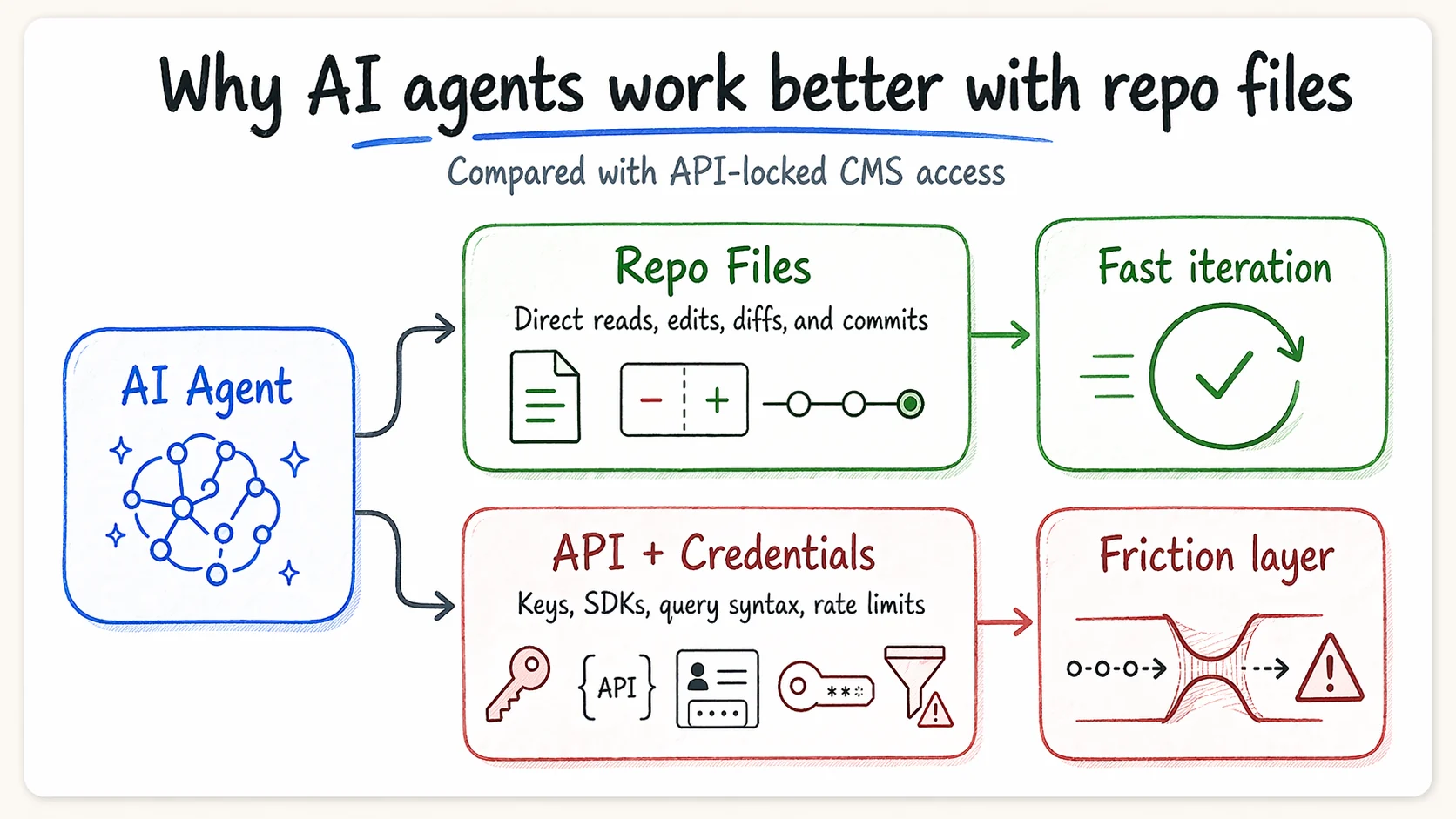
Git-based CMS with AI agents
Content as files is the natural substrate for AI agents:
- An agent can read, write, and modify Markdown files directly
- Bulk operations like "update every post that mentions the old product name" are a file search and replace
- An agent can create a new blog post by writing a
.mdxfile - Content reviews happen as PR diffs, so agents can review content the same way they review code
- No SDK, no API keys, no vendor-specific knowledge required
AI agents are generally better at working with files and code than with custom dashboards. When your content is already in files, the path from intent to change is short.
Headless CMS with AI agents
Content behind an API creates a barrier:
- Agents need API keys, SDK knowledge, and provider-specific query syntax
- Bulk content operations require orchestrating multiple API calls
- The agent cannot see your content by reading your codebase, because it lives in a separate system
- Real-time editing requires the agent to authenticate with the CMS and use its proprietary API
- Each CMS vendor has a different API, so agent tooling is not portable
Some headless CMSs are adding AI features to their dashboards. But that is AI inside the CMS, not AI that works with your content as part of your broader development workflow.
Why this matters in 2026
The trend is clear: developers are using AI agents for more of their workflow every month. The CMS that works best is the one where AI can reach the content without friction. In 2026, that usually means files in a repo.
Cursor moved their entire site away from a headless CMS specifically because their AI coding agents could not interact with content trapped behind API calls. The migration deleted 322,000 lines of code and eliminated a $56,848 CMS CDN bill.
Cost Comparison
Headless CMS costs
Most headless CMSs charge based on a combination of:
- Seats — per-editor pricing
- API calls — metered usage for content delivery
- Bandwidth — CDN and API transfer costs
- Storage — media and content storage limits
- Environments — staging and preview environments are often paid add-ons
For a small team, the bill can start low. For a growing team, it often rises quickly once you add seats, bandwidth, storage, and usage.
Self-hosted options like Strapi and Payload avoid vendor fees but add server hosting, database, and maintenance costs.
Git-based CMS costs
- Content storage — free or near-free, because the files already live in your repo
- Version history — free, because Git already gives you history
- Content delivery — usually cheap, because the site is served like any other static project
- CMS tooling — varies; GitCMS charges a one-time fee per site, while some git-based CMSs have free tiers or are open source
The fundamental cost advantage is structural: there is no separate database to host, no API to serve, and no content layer to pay for separately.
Real-world example
Cursor's CMS CDN bill was $56,848 over a few months. After moving to Git-based content, that cost dropped sharply because the content became static files deployed with the site.
When to Pick a Headless CMS
A headless CMS is usually the better choice when:
- Your content team is non-technical and needs a polished, standalone editing interface that does not involve Git concepts at all
- You need real-time collaborative editing — multiple people editing the same content simultaneously, Google Docs-style
- Your content model is deeply relational — products reference categories reference tags reference localization bundles, all with enforced referential integrity
- You serve dynamic, personalized content — A/B testing, audience segmentation, and runtime content selection based on user data
- Content is consumed by multiple frontends — a website, a mobile app, and a third-party integration all pulling from the same content API
- You need built-in localization workflows — some headless CMSs have mature i18n pipelines with translation management built in
When to Pick a Git-Based CMS
A git-based CMS is usually the better choice when:
- Your team includes developers who already use Git daily and want content in the same workflow
- You want content and code to ship together — one PR, one review, one deploy
- AI agents are part of your workflow — content as files means agents can read, write, and review content directly
- You value portability — your content is Markdown files that work with any framework, not data locked in a vendor database
- You want predictable costs — no API metering, no bandwidth charges, no seat-based pricing that scales with your team
- You are building with a static site generator — Astro, Next.js, Hugo, Nuxt, SvelteKit, Eleventy, Docusaurus, or any framework that reads content from the filesystem
- You are an indie builder or small team — minimal infrastructure, no separate service to maintain, content lives right next to code
Migration Considerations
Moving from headless to git-based
- Export content — most headless CMSs offer JSON export. Convert structured entries to Markdown/MDX files with frontmatter
- Map your schema — translate CMS content types to frontmatter schemas, using Zod, TypeScript, or YAML-based validation
- Handle media — move images from the CMS CDN to your repo or a dedicated media host
- Update data fetching — replace API calls with filesystem reads, which most static site generators do natively
- Set up your editor — configure a git-based CMS like GitCMS to give editors a visual interface
The biggest risk is flattening a deeply relational content model into files. Start with the simplest content types, like blog posts and docs pages, and migrate incrementally.
Moving from git-based to headless
- Parse frontmatter — extract metadata from Markdown files and map it to CMS fields
- Import content — use the CMS API or import tools to create entries
- Rewire your frontend — replace filesystem reads with API calls
- Set up webhooks — connect the CMS to your build pipeline
This direction is often easier because Markdown is well understood and most headless CMSs have import tooling.
The Bottom Line
Both architectures solve real problems. The right choice depends on your team, your content model, and how you want to work.
If your content is primarily pages, posts, and docs, and your team uses Git, a git-based CMS gives you a simpler architecture, lower costs, native AI compatibility, and content that you fully own as portable files.
If your content is deeply relational, consumed by multiple frontends, or managed by a non-technical team that needs a standalone editing app, a headless CMS gives you the structure and tooling designed for that use case.
The trend in 2026 is moving toward git-based workflows. AI agents work with files. Static site generators are more powerful than ever. And developers increasingly want their content in the same repository as their code.
Whatever you choose, choose deliberately. The CMS is the foundation your content workflow is built on, and switching later is possible but not free.
Building with a static site generator and want to try the git-based approach? GitCMS gives you a visual Notion-like editor that commits directly to your repo. Works with Astro, Next.js, Hugo, and every major framework.